Week 3

COMP3100 portfolio entry #1

Introduction

To anyone that is reading these lines, welcome to my TechLauncher portfolio! This is the place where I'll be showcasing my involvement in the TechLauncher project I joined in semester 1, 2016. At it's core, "TechLauncher is an ANU initiative which enables students from any discipline to develop the research and professional skills required to use technology to bring great ideas to life and have a positive impact on our society." (Source). 

In TechLauncher, we are required to join a project and develop a software-related solution to a problem. Being an Advanced Computing student myself, my contributions have been programming-related.

This is actually my second semester doing this course. Since we weren't required to maintain a portfolio during the first semester, I shall attempt to provide a brief summary of my project's progress up until now. I'll mainly talk about the problem we are trying to solve, and try to explain the nature of the work we're doing. In future entries, I'll be talking about the project on a week by week basis and mostly focus on my own work, so I would recommend reading this entry, as I'll start assuming that readers are already familiar with what I'm working on in the future.


In any case, let's get started!

PairFit Logo

Details

PairFit

The project I've joined is called PairFit. Officially, PairFit "is a smartphone application that allows users to commit to their fitness goals through pairing with like-minded individuals" (Source). In my mind, however, PairFit is a tool that allows people to stay motivated and offers them the possibility to customize their workout schedule, by choosing where, when, and with who they will exercise. Having fitness buddies help with sticking to the program and dealing with shyness, when it comes to exercising (Source). As such, the goal is to create a platform that will facilitate the process of finding buddies to exercise with.

What we did in Semester 1

A really brief timeline of what was completed in Semester 1 is the following:


Week 1 to 2:  Team selection

Weeks 2 to 4:  High level planning

Weeks 4 to 14: Development of application

Weeks 14-16: Focus group testing

From week 17 up until now: Development of application


About two weeks at the start of the program were spent for allocating students to projects. After this, it took us approximately the same time to organise ourselves and also come up with a high level plan for PairFit, including a product backlog and concrete milestones and goals. We also set up our software engineering environment around this time, and agreed on a weekly meeting time. Some examples of what we did during this time can be seen below.

Moving on, after we finalised our plan with our clients, we started developing our product. We adopted an Agile project management approach, with weekly sprints. During each week, we would take the user stories of our product backlog, break them down to tasks, estimate the tasks and allocate them to the team members. Being able to rapidly establish the project, and coming up with a plan quickly allowed us to start developing quite early. As a result, around the time of week 7, we were able to demonstrate a small prototype during an in class presentation of our projects.

Around week 14, we had to stop developing, since we had to present our progress to a review panel for assessment purposes. In addition, we decided to invite a group of users to test our application, in order to get feedback. This was also the first time that someone external to the team had access to the app. The results were encouraging and verified that we were on the right track. Finally, we were also able to complete our MVP by this time, and took a brief pause from working on the app.

After the focus group, we started ironing out the bugs and fixing aspects of the app that the users considered to be lacking. This was during the end of semester 1, and for the whole duration of the mid year break. In addition, around this time we slightly readjusted our plan, as our clients had come up with new requirements.

And this brings us to semester two. At this point of time, our goal is to refine the graphical interface of PairFit, implement some new features and test the application, in preparation for release.

In the next portfolio entries, I will be going into more detail regarding the project and my contributions to it. This first entry is meant to make the readers familiar with events that have happened over the course of 6 months. I could go into more detail, but this would almost certainly bore users. Instead, I'll provide a collection of some annotated artifacts (such as images and diagrams) that will help provide a better overview of the project. Also, for Android users, the app can be downloaded here. iOS users can send an e-mail to arash@pairfit.com.au to request access to the beta version of the app.


Gallery

Semester 1 Project Review slides

Details

Alpha Designs

Sample requirement before being translated to user stories

Requirements:


1 x Profile Mobile App Screen design


The name of the application is PairFit. It is a social fitness platform aimed at pairing like-minded individuals based on their fitness level and interests. It also will be a fitness tracking and management system that will allow users to track their fitness goals and progression.


The mobile app screen (iOS and Android) that we need designed is the Profile Page for a user. This will be for how the users see other people’s profile (i.e. with the goal of showing info detail to get a person to request a pair from you)


The design for 1 mobile app screen (including scrolling depending on the design) will need to include the following information on the page:

Details

Software engineering environment

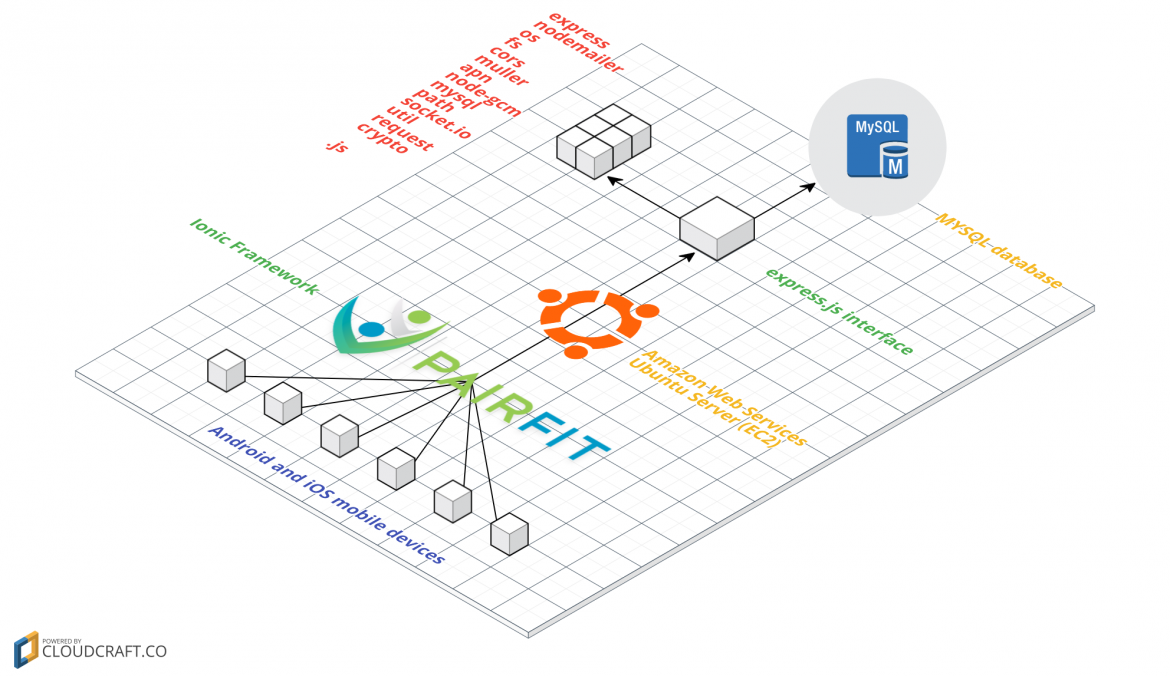
Development Framework: Ionic

http://ionicframework.com/

Code management: BitBucket

https://bitbucket.org/

Issue tracking: Jira

https://www.atlassian.com/software/jira

General documentation: Google Drive

https://drive.google.com

Testing framework: Protractor

http://www.protractortest.org/#/

Communications: Slack

https://slack.com/

Details

Sample system architecture diagram

Details

Jira, our issue tracking tool

Details